
Google Analytics Settings in Google Tag Manager

Do you have similar Google Analytics settings that you keep having to enter each and every time you enter a new tag in Google Tag Manager? Well fret not as Google has saved the day for you with “Google Analytics Settings” as a variable inside of Google Tag Manager. This variable allows you to set all of the typical settings you used to set at the tag level, but now you can save yourself some time by doing it once at the variable level.

How Do Google Analytics Settings Help?
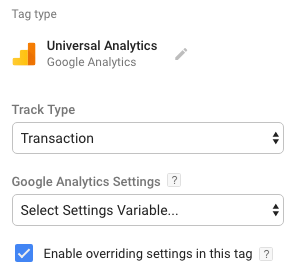
Great question and I’m not so sure I would ever use them. Why? Well there are times when you may want to set the same Custom Dimension across every GA fire. Or, more likely, the cookie domain status field. The big thing to remember here is that whatever you set at the variable level will then be applied EVERY TIME a tag with that variable fires. If you want to set these to be more specific at the tag level then you can do that by selecting the “Enable overriding settings in this tag” option.

A Common Issue This Doesn’t Solve: Tracking Code
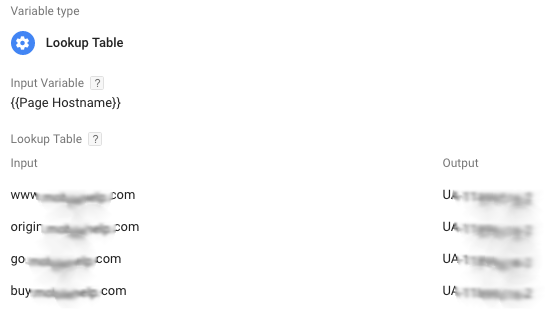
While using Google Analytics Settings variables will help make field settings easier they do not help with the problem of having different Universal Analytics account numbers per domain. Typically we will use a “Lookup Table” to serve up the right UA-### based on the hostname a user is accessing the site from. So for instance staging.bluefinstrategy.com vs. www.bluefinstrategy.com (please tell me you have different Universal Analytics accounts for these?!?!). This is important when you have tons of different Google Analytics Events and other things that you’d like to track. Why? Well, typically you’ll want to test them on a staging environment first then push them to production. Instead of having to change the tag when you do that push using a variable allows for the tag to work automatically on both domains!

Both the tactics above allow you to replicate settings using variables and should speed the entry of new Universal Analytics tags within Google Tag Manager. Happy Tagging!
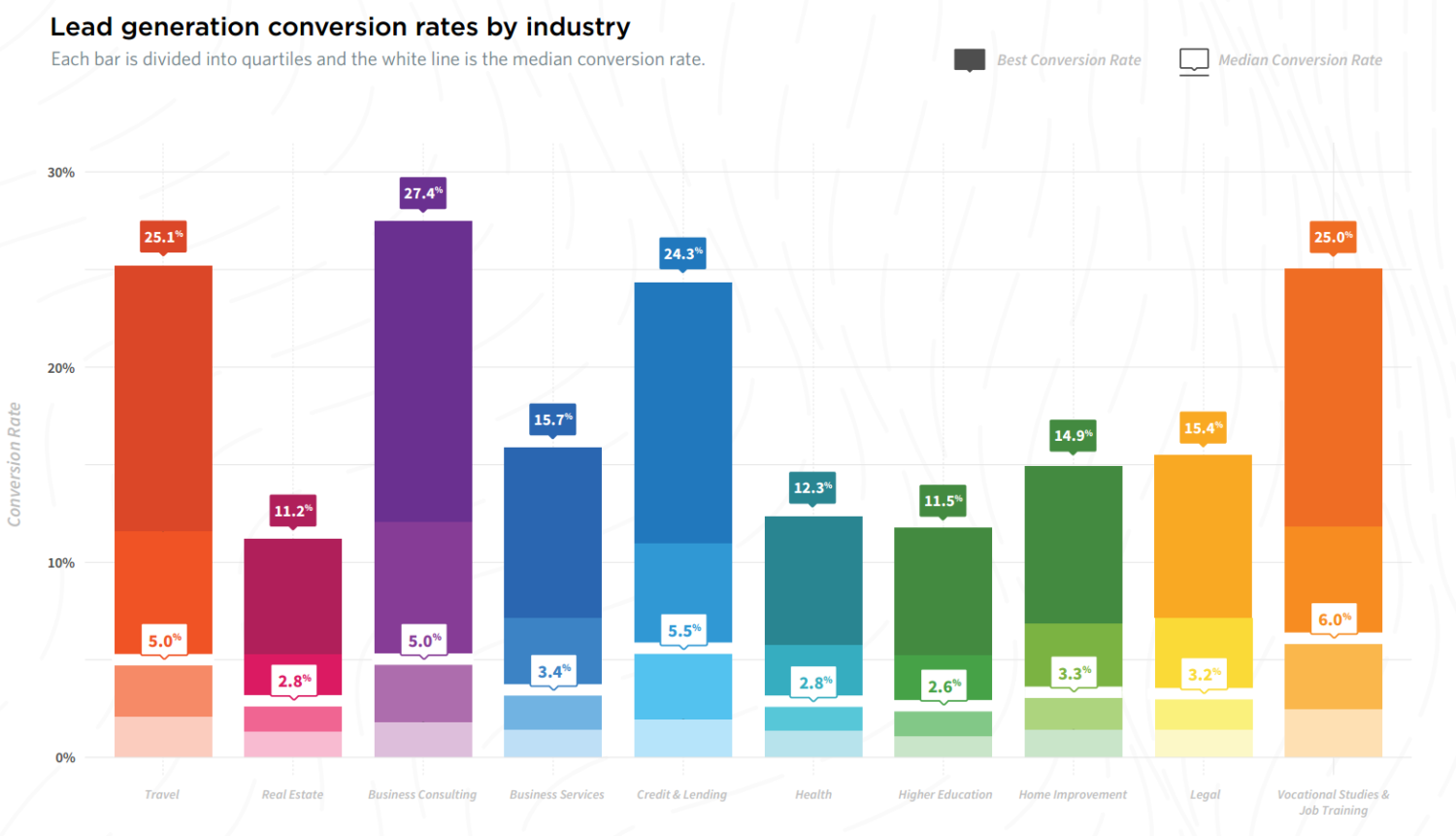
Median Lead Generation Rates by Industry

Landing Page Conversion Rates by Industry 2017

The smart people at Unbounce recently released their 2017 Conversion Benchmark Reports detailing an in-depth breakdown of lead generation benchmarks per industry.

While it’s an amazing benchmark report to download (and you all should), one of the biggest items the document covers is the answer to a question most marketers get asked frequently.

What is the average landing page conversion rate for our industry?

Median Landing Page Conversion Rates by Industry

  • Business Consulting 5.0%
  • Business Services 3.4%
  • Credit & Lending 5.5%
  • Health 2.8%
  • Higher Education 2.6%
  • Home Improvement 3.3%
  • Legal 3.2%
  • Real Estate 2.8%
  • Travel 5.0%
  • Vocational Studies & Job Training 6.0%

How Does Your Landing Page Stack Up?

Are you meeting these benchmarks? They may seem like small numbers, but we’ve seen worse. There are a few reasons landing pages aren’t quite as effective as they should be. Take a moment to think about if these issues are affecting your landing pages and take steps to correct them:

  • Asking for too much personal information : Do you ‘really’ need to collect gender or their affinity for Batman vs. Superman
  • Lost Call To Action (CTA) : Are you directing people to a specific action? If you look at the page for 3-seconds can you easily spot the directive?
  • Missing information or lack of relevancy : Consider ‘how’ visitors are arriving on this page. Are you teasing them with an offer or information that isn’t present on the page? Don’t laugh, this happens ALL THE TIME!

Technical SEO Agencies & You

Recently a friend asked me to help him evaluate some SEO agencies much larger than we are (so we weren’t upset…). As we went through the process a theme developed over and over again. Nearly every agency focused on Technical SEO at the outset and then a ‘pass the buck’ approach with ongoing optimization. So I figured it was important to jot down some things you should consider when evaluating SEO agencies so that you don’t get caught in their margin game.

A Solely Technical SEO Focus

Not to discount this tactic, as it is incredibly important, but it is not the sole thing you should focus on. A solid technical foundation helps your site get found and ensures that your content is able to be read by the search engines. But that content it is reading must still be well-written and supporting a keyword theme. Therefore, having perfect technical SEO on a site won’t get you far if you sacrificed content. Make sure your agency is focused on a holistic content strategy as opposed to just fixing the technical stuff! Ask them how they approach keyword research, do they have content writers on staff, do they conduct voice exercises, etc.

Here’s a Report For You

Ongoing SEO requires vigilance to searcher behavior, search engine algorithm changes, content-writing, and back-links. There’s plenty more, but the main thing you do not see listed there is “reporting”. Is reporting important? Absolutely. BUT, you can go buy one of the tools yourself. We use Moz, SEMRush, Screaming Frog, among others. Go download or use them. They are awesome. OK, now that we gave you our secret sauce, how’s your SEO? Hiring an agency is more than the tools they bring to the table. It is the experience and strategy that they bring. Ask your agency what a typical monthly engagement looks like. How often are they re-evaluating keywords, do they have a strategy for algorithm pivots, how often are they writing or suggesting articles, and how many websites do they typically go after for back links?

What Does it all Mean?

A solid >90% of agencies out there push as much work as possible upon lower cost resources in order to increase margins. Everyone does it, even at the grocery store. The issue in the agency world is that often this results in a lack of strategy to the client. Our advice, constantly challenge your agency on new ideas, industry news, keyword suggestions. Don’t just accept a monthly report of numbers, but request an action plan of recommendations and how they are keeping you on the forefront of the SEO world!

The SEO Value of Breadcrumb Navigation

Website navigation gets a lot of attention when it comes to usability and SEO.

If my own experience with hundreds of websites is any indication, that fourth one likely stands out for some of you.

Do Breadcrumbs impact SEO?

Yes.  As with most on-page content, when breadcrumbs are properly optimized they can improve the overall SEO health and usability of your site in a few ways:

  • Breadcrumbs influence triggering site hierarchy in your search results
  • Improves a Search Engine’s ability of crawl your site
  • Improves a Search Engine’s ability to attribute links more efficiently based on site hierarchy
  • Improves and supplements the usability of your complex navigation

How do I optimize my Breadcrumbs for SEO?


  1. Ensure that your breadcrumbs are accurately displaying across your site with an accurate category hierarchy
  2. Add structured markup to your breadcrumbs using the BreadcrumbList schema
  3. Follow Google’s guidelines on Breadcrumb optimization.

Matt Cutts also provided some insight into why, if you already have Breadcrumbs on your site, why it may not be showing in search results: