Using Dimensions in AdWords to Optimize Campaigns

Google AdWords needn’t be difficult to manage and you don’t need expensive tools like WordStream nor Marin if you’re a small company or have a small budget under $2,000 per month. AdWords offers several amazing tools out of the box that are simple to use and provide great optimization benefits. Below are a few easy dimensions AdWords provides that can help you spend your money more efficiently.
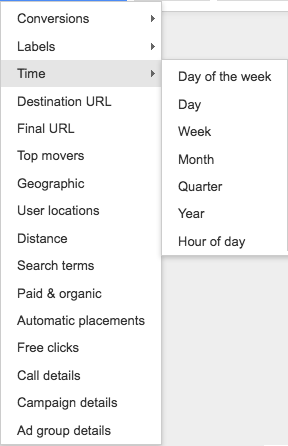
adwords dimensions

AdWords Dimension: Hour of Day

Since you set AdWords budgets by day often times clients run out of money before the day is done. Now, AdWords does have the option of spreading your budget more evenly throughout the timeframe you select but even then it is possible to miss out on qualified visitors. By seeing what times of day searchers not only click on your ads but also go through and convert you are able to adjust your budget for a more optimized timeframe. For instance, on one client’s account we found that PPC conversions only happened over the span of nine to three. So we adjusted the budgets and our Cost Per Acquisition (CPA) sank dramatically as a result!

AdWords Dimension: Day of Week

Similar to Hour of Day the Day of Week dimension allows you to target your spend even more effectively. Knowing the exact days that searchers click and convert more allows you to target those days only or perhaps spend less on those days. This helps further reduce your CPA and optimizes your overall monthly spend.

AdWords Dimension: Geographic

If you are a nationwide brand it is often tempting to target the entire United States with your PPC campaigns. However different geographies convert better than others. The Geographic dimension allows you to see State, Region, Metro, City and Most Specific Location data. Additionally you can also see if a searchers was physically in a certain location or if they were just searching terms about the location. This may help with travel, mortgage, or other companies that serve customers outside their local geography.

Use these great reports to better optimize your PPC budget and drive more conversions!
Writing SEO Titles that Encourage Clicks

If you’ve been working in the SEO field for any length of time, you’re likely familiar with the standard Title template:

Primary Keyword | Secondary Keyword | Tertiary Keywords | Brand Name

The idea that it’s good SEO to have all your keywords in your Title Element, while a proven method, has begun to lose it’s luster over the last few years.  While it allows a Title element to cover all bases and may help admittedly with ranking signals, more and more Google is paying attention to engagement and user-intent than ever before.

This also ignores the increase in search prowess for the typical user who has begun to attribute certain mental models to what they encounter in search results.  Take for instance these two examples of a Title element:

  • Affordable Desks | Cheap Desks | Budget Desks – Desks-For-Less
  • Quality affordable desks that fit any budget | Desks-For-Less

The first hits all the standard marks.  Lead with your primary keyword, list your secondary keywords and your brand.  However, when compared to a title wrote towards the intent of the user, it reads as spammy and robotic while the latter still includes the primary keyword but drives home their value.   The issue at hand has become that optimizing Titles has been long stuck in optimizing for rank while meta-descriptions were to influence engagement versus the more modern ideal which is optimizing both for engagement.

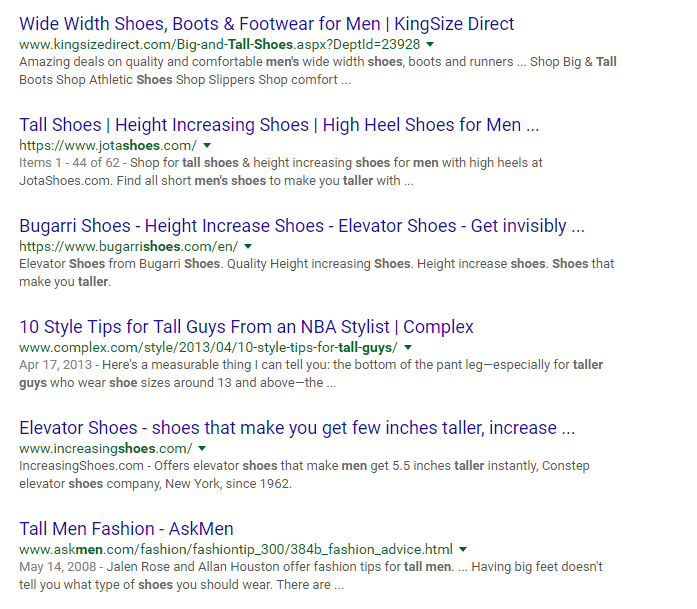
What many marketers forget is that their search results are not just competing for rank but competing for engagement against results that may be more optimized for relevance and engagement than theirs.  Take for instance these results for “Fashionable shoes for tall men” (I’m 6’8″ so this search happens daily):

google search results for tall fashion

Despite my searching for what fashionable shoes for tall men, many of the results are targeting someone wanting a shoe that makes them taller.  Taking that to the Title Element, compare the Tall Shoes | Height Increasing Shoes  to the 10 Style Tips for Tall Guys from an NBA Stylist result and imagine which would be more enticing to me based on my search intent?

When approaching the Title element, try and consider why a user is searching for your products or services.  While keyword data may return a number of variants for the same product, the days of simply adding each into your Title and measuring its success solely on rank are behind us.  The goal should be combining your keyword data with the topics and user intent behind your customer’s searches so that your search results provide the most relevant option to them.

Want to learn more?  Moz has put together a good list of 8 old school SEO best practices that are no longer effective including a section on Title elements.


How to run simple AB testing programs with Google Analytics

AB testing can sound daunting at times. I suspect this is why so many organizations have yet to conduct much testing of their own. So in the light of the new year and resolution setting here’s to a 2017 full of ab testing!

Step number one of AB Testing: Plan

We have already discussed what to ab test previously, but once you have that idea you need to enact a plan to implement it. For our article we’re going to assume that you’re testing easy things, such as button colors or page layout changes. These are typically easy things for a marketer to do within their content management system and it’s the first place to start when dipping your toe into the AB testing game. Here are some quick things to keep in mind:

  • Start with small and easy changes
  • Consider starting with either a page at the end or beginning of your conversion funnel
  • Have one or two page variations, but no more than that

How to setup an ab test in Google Analytics

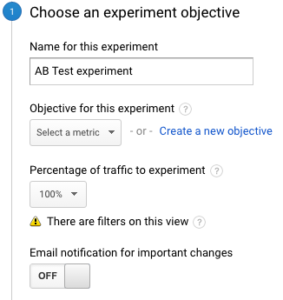
Setting Up Google ExperiementsOnce you create an experiment you have a bunch of quick and easy settings to get you up and running. If you already have goals set up in GA (and if you don’t call us immediately) you can select them via a dropdown for your test conversion. Then, you must decide if you want all traffic to the original page to be part of the AB test or just some. We would typically recommend just doing 100%. In the Advanced Settings we would advise when you’re first starting to distribute traffic evenly across all variants. When Google starts deciding, especially with low volume, it can get wacky very quickly. For example, at 100 sessions, if the Original saw 25 conversions and Variant 1 saw 15 Google would start showing Original more often. But 10 conversions isn’t hard to make up and in our example it’d be just 10% of the sessions!

The next step is implementing your page variants. It’s as simple as entering the URLs of the pages. So the Original URL is the page as it currently exists and the variants are your competitors. It’s literally that simple. Once you enter these pages and click “next” Google Analytics will give you code to place on the Original page. There are tons of different content management systems out there, but for WordPress you can simply edit the header.php file:
google experiments in wordpress
…Or you can use a plugin such as Simple Content Experiments. Again, your content management system should have some sort of way to implement the GA Experiments code in the head tag somewhere, just ask your development team.

That’s it for implementation. If you want to do simple AB tests any marketer with a good CMS could have a test up and running in a matter of hours. So what then are you waiting for? Get to testing and watch your website conversions skyrocket!

Tools to Help with Keyword Research in 2017

SEO continues to evolve as it always has and one of the core aspects of SEO, keyword research, is no different.

While the classic method of keyword research has been identifying the best keyword opportunities and then creating individual pages with on-page content focusing on those exact keywords, Google’s continued focus on user-intent has forced content creators to focus on the intent of a user’s search versus matching towards select keywords.

So, with Google focusing more and more on returning results that match with the full intent of a user’s search versus matching keywords, what does that mean for you?  Does the classic style of exact keyword research still work?  Or should you be focusing simply on researching broad, topical context strategies when creating and optimizing content for SEO?

Most experts in the SEO realm, like Moz, believe that a combination of the two keyword research strategies is what will continue to work best.

Tl:dr: Keyword research in 2017 should focus both on what question is your content answering and what questions are your target customers asking?

That means that the classic method of keyword research is still vital but so is making sure you understand if your content is answering the same question topics your customers are asking.

What tools should I use to research at Topics?

There’s a host of good topic research tools out there, he’s a few of my favorites:

What tips or tools have you found useful for your online marketing in 2017?