
How To Set Up Google Analytics Accounts, Properties & Views

The setup process is well documented by Google and other websites, so here we will discuss the strategies behind setting these up.

Account

This is the highest level and is the umbrella that houses your Properties and Views. You are limited to 100 Properties within an Account. Very rarely will you need to exceed this limit unless you are an agency or have tons of random domains. Although the latter probably contains SEO issues as well. Our advice is to start with a single Account and read on.

Properties

Here is where the strategy begins. Properties are typically used for a single website address. Often marketers will setup a separate Property for sub-domains as well. Our advice is to track all traffic under a single Property utilizing different Views UNLESS:

  • You want to limit login access to different data sets (You cannot do this for Views)
  • Traffic between sub-domains does not happen, so they are independent and visitors do not cross between them

Views

View filters allow some pretty granular targeting so we opt to use different Views when we can. The biggest problem is that Google Analytics restricts you to just 25 Views. To start we always recommend a Raw Data View that is completely unfiltered. This may help diagnose website issues down the line. From there we will discuss how we want to see our data. Here are some questions we typically ask to determine if a View is needed:

  • Do we need to replace URLs to better group webpages?
  • Do we have very specific site sections, such as News or Sports, that we want to easily see separately?
  • Are we focused on a particular traffic source?

Remember that Views are NOT retroactive and often you can utilize Advanced Segments for many of these reports. Typically we only advise different Views if you need to rewrite URLs (your or any other data for that matter). If not, Advanced Segments should do the trick, AND they ARE retroactive!
Marketing Shortcuts are Short-Term: Why CRO Matters

A reliance on marketing shortcuts due to a swell in responsibilities and aggressive goals for marketing teams is helping in the short-term but hurting companies in the long-term.

When a marketing team is challenged with increasing their KPI’s, the majority of marketers often looks at ways to send more traffic through their conversion funnel. The reasons are simple. If we’re off by 10 leads and our funnel converts at 2%, we just need to send 500 more visitors through the funnel.

This same routine typically repeats itself over and over again as more aggressive goals begin to strain the efficiency of your funnel, requiring more and more budget for additional top of funnel visitors.

While this solves the short-term, over the long-term this adds up in terms of budget costs and the inevitable discovery they’ve hit a plateau with “good traffic”.

More often than not, client’s come to us asking us how they can get more “converting” traffic once they’ve hit this plateau and our answer is usually “When is the last time you looked at your conversion funnel?”

Digging into the Conversion Experience

Most marketers dig into the conversion experience only when they realize that their traffic performance is dwindling and they’re in danger of missing their department goals.  The inherent danger of that is that by this point, this quickest fix is throwing more traffic at the problem and the most common way to do that is to pay for it.  You slide just over your monthly/quarterly/annual goal, now with a tighter budget and the problem compounds.  More money spent on throwing users into a broken conversion funnel.

So how do you fix this?

Create a Testing Plan

Trouble with conversion rate optimization is that most marketer’s don’t know where to start.  Traffic is the easiest so we always start there but we forget that the biggest reason users don’t convert is because we didn’t let them. The landing page didn’t load on mobile.  The email didn’t tell them where to go if they’re interested.  The sign-up form asked them questions they didn’t think were relevant for your offer. Sales didn’t call them back for a week and your competitor called them back the same day.

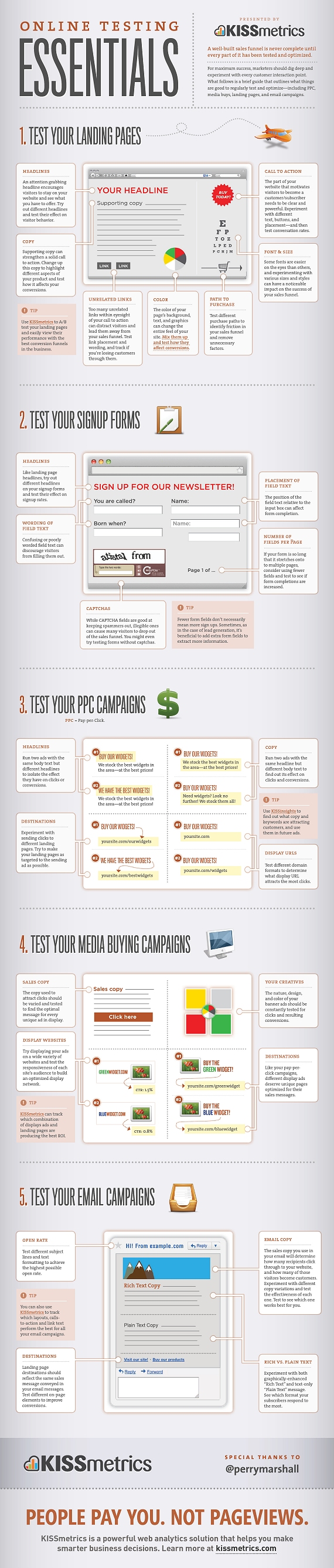
The list goes on.  Truth is, start somewhere.  The below infographic from KISSmetrics is a great starting point.

Online Testing Essentials: An infographic on what online marketing activities to test.
Source: Online Testing Essentials: An infographic on what online marketing activities to test.

How to Set Up Google Analytics

Over the last few weeks we have encountered several businesses that either do not have web analytics of any kind or they have analytics implemented but not well. This is an issue that is near and dear to my heart as a data geek but also as a marketer in general. How is it possible to know what is working and what is not when you don’t have proper tracking in place? So in the interest of making everyone smarter and better at tracking we have decided to do a six-part blog series that covers everything you will need to develop a strategy for setting up Google Analytics from start to finish. There are a million blog posts out there about the tactics of setup, but with this series we are trying to explain the how’s and why’s so you can develop a killer analytics strategy to get the actionable data you need!

How to Set Up Google Analytics