
Google Analytics Data Retention Policy & GDPR
You have to hand it to the Europeans, they really care about their consumers. So much so that starting May 25th, 2018 the European Union (EU) is instituting the General Data Protection Regulation, or GDPR for short. There is a lot going on with this regulation (read MarTech’s handy guide about GDPR) but at its core it is about not storing personally identifiable information. Technically you shouldn’t have been doing this via Google Analytics in the first place, as it violates their TOS. Again, a severe oversimplification there, but that’s kind of the gist.
Google Analytics and GDPR
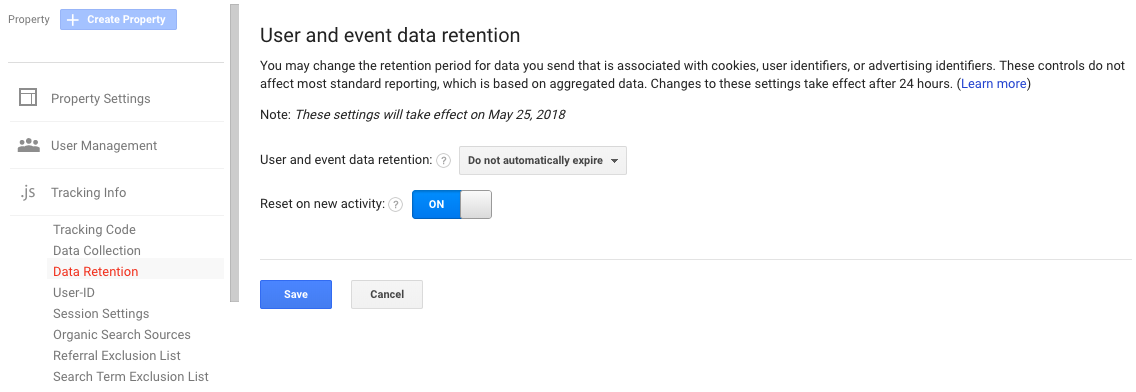
Data Retention settings are under ‘Tracking Info’ in your web analytics Property.
You may have seen an email in your inbox about Google Analytics’ Data Retention Policy and how you now have the ability to adjust your data retention settings. It is kind of a way for Google to ‘pass the buck’ a bit as they are now the ‘co-controller’ of users’ data along with the website owner, but in reality it is the right move because YOU should be in control of your users’ data and not Google. NOTE: Google is defaulting this to 26-months! If you’d like to change this you must login to the analytics admin for each Property, click on Tracking Info >> Data Retention Settings and adjust accordingly. You may also elect to use the “Reset on new activity” option, which is set to ‘Yes’ by default. This means that if a user re-engages with your site their counter restarts (eg: If a user comes to your site, then doesn’t come back for 25-months their information will not be on the block for deletion for ANOTHER 26-months).
GDPR and You
So, technically this only affects citizens of the EU. However, if an EU citizen visits your website you are now liable for their data protection rights under GDRP. So, you can A) Prevent EU residents from accessing your website, or B) comply with GDRP. I guess option C would be to just take the smug American ‘I don’t care’ attitude, but we don’t advocate that here. Again, since Google’s TOS are pretty clear about personally identifiable information you really should already be in compliance.
What Data Does GDPR Affect in Google Analytics?
According to Google; “If you limit the retention of user data to 14 months, then any information associated with conversion events that occurred more than 14 months ago will be lost, for example, the Source, Medium, and Campaign information associated with first_open events that occurred more than 14 months ago.”
But remember, this ONLY affects sites collecting personally identifiable information. So if you are collecting User ID, Client ID, or have personal data in URLs via query string (eg: /page-a?user=bob-smith) then the dire warning above is for you. If not, you’re free! (for now).
What does Bluefin Strategy Advise?
From what we can see (and we are not lawyers), we will be recommending the following settings for our clients:
- ALL clients should double-check their URL strings to ensure no personally identifiable information is present
- MOST clients should set Data Retention to “Do not automatically expire” and ensure that any User ID and Client ID capture is removed
- For those clients that REQUIRE User ID and/or Client ID as part of their reporting we will be advising that they follow Google’s default and expire the data after 26-months
This advice may change down the line, so it’s always best to contact us so we can chat through your specific tracking needs before making a sweeping change to your analytics data.


